

Description

Key Technical Parameters
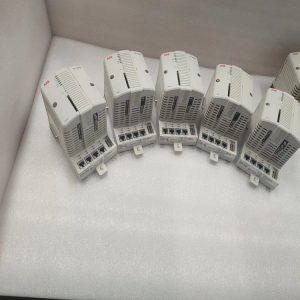
Device Type: Rack‑mount plug‑in processor unit Part No: PM864A Core processing unit for AC800M controller platform Memory configuration includes built‑in RAM and Flash for firmware and application storage Multiple communication interfaces for control bus and engineering access Supports IEC 61131‑3 standard programming environment Powered through rack backplane bus Multi‑LED lights display operating and fault status locally Operating temperature range: 0℃ ~ +60℃, non‑condensing For indoor cabinet installation only, with CE and UL industrial approvals Note: It cannot run independently. Corresponding I/O hardware and matched firmware version are required for normal operation.
Practical Application Features
Responsible for real‑time logic computation, analog loop calculation and interlock protection tasks of automation systems. Realizes data exchange with local and remote I/O modules via internal control bus. Supports project download, debugging and diagnostic access from engineering workstation. Built‑in hardware diagnosis can feed back module running state and abnormal information to upper monitoring equipment. Widely matched with process‑control cabinets in chemical, power, pulp‑and‑paper and water‑treatment industries. Mainly used for on‑site equipment overhaul, old‑system renovation and spare‑part replacement scenarios.
Field Installation & Commissioning Guidance
Cut off rack power supply before module disassembly or installation. Insert PM864A into specified slot and lock in place. Complete related bus wiring according to site drawing requirements, pay attention to terminal resistance setting for field‑bus. Finish hardware configuration in engineering software, install compatible firmware and download user application program. After power‑on, observe module LED status to confirm no hardware fault exists. Verify communication condition between processor and each I/O module, test logic response and signal acquisition performance. Ensure cabinet ventilation works well, avoid long‑time working under over‑temperature environment. Regularly check rack power quality and terminal tightening condition for long‑running equipment.
In‑Site Troubleshooting Reference
- All LEDs remain off: Check rack back‑plane power supply, inspect back‑plane contact or internal power circuit damage.
- Controller fails to start: Firmware version mismatch, project file corruption, Flash memory abnormality. Re‑install matched firmware and project.
- Fail to communicate with I/O modules: Poor back‑plane contact, incorrect hardware configuration parameters.
- Field‑bus communication drops occasionally: Missing terminal resistor, cable damage, electromagnetic interference on‑site. Check wiring and cabinet grounding.
- Logic running abnormality: Program cycle time overrun, parameter configuration error, firmware inconsistency between modules.
- Random irregular alarms: Cabinet overtemperature, power‑supply fluctuation, poor shielding grounding. Optimize heat dissipation and grounding treatment.
Reviews
There are no reviews yet.