

Description
Core performance characteristics
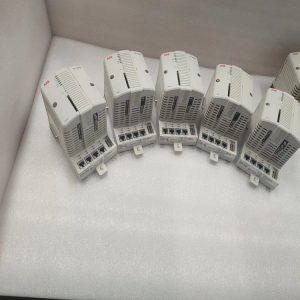
SPBRC410 is a slot‑in controller for Symphony Plus harmony rack. It connects to system backplane bus for interaction with other DCS hardware. Equipped with one RJ45 Ethernet port for Modbus TCP master/slave communication, linking remote instruments, third‑party PLC and SCADA host. Non‑volatile onboard memory stores control application, configuration parameters and event logs. Internal real‑time clock maintains time stamp for alarm records, powered by replaceable backup battery upon main power loss. Multiple LED status indicators display module run status, bus activity and internal fault information for quick on‑site diagnosis. 24 VDC backplane‑supplied power, no separate external power wiring. Supports hot‑swap replacement under powered rack condition without shutting down whole system. Hardware self‑supervision mechanism continuously monitors processor, memory and communication circuits and triggers fault alarm for internal anomalies. Operating temperature range: 0 ℃ ~ +60 ℃; storage‑40 ℃ ~ +85 ℃. IP20 protection class, for cabinet‑inner installation only. Redundant dual‑SPBRC410 configuration is allowed for critical control loops.
Field usage conditions
Commonly deployed in power plant, pulp‑paper and chemical DCS cabinets based on Symphony Plus platform. It solves data‑exchange requirements between DCS and Modbus‑TCP‑capable third‑party field equipment, avoiding additional independent gateway hardware. Besides protocol conversion, it can run independent local control logic. When main system communication is interrupted, it keeps essential interlock and regulation tasks running locally. Frequently used for legacy INFI90 / Symphony system upgrade and retrofit projects. Existing rack mechanical structure can be reused; replace old bridge module with SPBRC410 to add Modbus TCP access capacity. Suitable both for new‑project configuration and emergency spare‑part stock for running plants.

Practical deployment considerations
Though hot‑swap function is supported, avoid frequent plug‑in‑out under running status to reduce mechanical wear of backplane connector. Check connector pins for dirt and oxidation before installation. Complete configuration download and parameter backup after module mounting. Match firmware revision with the whole Symphony Plus system; version mismatch may lead to bus communication failure or incomplete function. For Modbus TCP network layout, isolate this control network from office LAN. Take reasonable network load control, prevent broadcast storm affecting controller real‑time performance. Replace backup battery periodically to prevent loss of time‑stamp and configuration risk. Do not disassemble module housing on‑site. When permanent hardware fault occurs, perform hot‑swap spare‑part replacement. During routine maintenance, inspect LED status, event log and battery aging condition.
Typical on‑site symptoms & handling ideas
- Run LED stays dark after rack power‑on: Check backplane 24 VDC power supply. Re‑seat SPBRC410 in rack slot. If backplane power is normal, internal hardware damage shall be suspected.
- Fail to communicate with Modbus TCP devices: Verify Ethernet cable and switch port status. Cross‑check IP address, slave station number and timeout parameters. Inspect network for heavy broadcast traffic.
- Intermittent system bus communication drop‑out: Check rack slot locking condition and backplane connector contamination. Confirm firmware version consistency with surrounding DCS modules. Monitor cabinet ambient temperature to avoid over‑heating.
- Module reports internal fault alarm: Read event log via engineering tool. If temporary interference is eliminated and alarm still exists, execute spare‑part replacement.
- Time stamp disorder for events: Check backup battery voltage. Replace battery and resync system time from DCS time‑master source.
Reviews
There are no reviews yet.