

Description

Core performance features
‑ On‑board dedicated 200 MHz communication processor, independent from RX7i main CPU, isolates network load from control logic execution. ‑ Network interfaces: dual 10/100 Base‑TX RJ45 ports, auto‑negotiation for speed / duplex, auto‑MDI‑X crossover detection. Two ports can work as separate network channels or form basic network redundancy path. ‑ Serial interface: one RS‑232 DCE 9‑pin D‑sub station‑manager port, baud‑rate range 1200‑115200 bps, for local module diagnostics and firmware download. ‑ Supported industrial protocols: SRTP, Modbus‑TCP server & client, EGD (Ethernet Global Data Class 2), Reliable Data Service (RDS), TCP/UDP/IP stack. Supports redundant‑IP function for hot‑standby CPU system, one floating IP can follow active controller in redundant pair. ‑ Diagnostic capability: on‑board hardware monitors link status, network error counters, packet loss statistics. Module‑level fault status can be read by controller logic. Stores network‑related event logs inside local flash memory. ‑ Power supply: draws max 1.5 A @ 5 VDC from VME backplane; no external field power terminals, fully powered by rack back‑plane. ‑ Environmental specifications: operating temperature 0‑60 ℃; storage temperature‑40 ~ +85 ℃; humidity 5‑95 % non‑condensing; IP20 protection grade, cabinet‑internal installation only. ‑ Compatibility note: Works with full RX7i CPU family including CPE and CRE redundant series. Firmware of ETM001 must match controller firmware baseline; version mismatch may trigger EGD jitter or Modbus‑TCP connection instability. This board occupies one VME slot position inside RX7i chassis.
Physical appearance
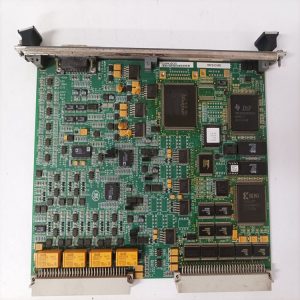
Standard 6U VME horizontal plug‑in circuit board, fits RX7i rack VME slot. ‑ Front metal faceplate: two RJ45 Ethernet sockets, one 9‑pin female D‑sub RS232 connector; multi‑LED indicators: MODULE OK, LAN ONLINE, 100 M speed indicator, LINK status for Port 1 and Port 2. Metal ejector latches for insertion and extraction. Part‑number label printed IC698ETM001. ‑ Rear side: large‑size VME golden‑finger contacts for back‑plane power supply and VME‑bus data interaction. ‑ No sealed metal housing; bare PCB with reinforced metal front panel. All network and serial connections are completed on front‑panel connectors, no field process signal terminals.
On‑site application scenarios
Mounted inside power‑plant and petrochemical automation cabinets. It undertakes heavy‑load Ethernet communication tasks for RX7i rack: exchanging real‑time tags with HMI/SCADA hosts, EGD peer‑to‑peer data transfer between multiple PACSystems controllers, Modbus‑TCP connection to third‑party intelligent instruments. Off‑loading network processing to ETM001 protects CPU scan cycle from being disturbed by burst network traffic. If this communication module fails, all Ethernet‑based upper‑host and peer‑controller data exchange will be interrupted, but local rack control logic will keep running normally. After replacement, download module network configuration including IP address, subnet mask, gateway, EGD exchange table and Modbus‑TCP parameter. Verify VME‑bus handshake status, test two Ethernet channel link performance and serial diagnostic port function before putting online.
Installation & operating notes
‑ Even in redundant‑system environment, power‑off replacement is recommended for field‑site maintenance to avoid scratching and oxidizing VME golden‑finger contacts. ‑ Use industrial shielded twisted‑pair cables for Ethernet wiring. Keep network cables physically separated from high‑power cables to reduce electromagnetic interference which causes link flapping and packet loss. ‑ Maintain good cabinet ventilation. High ambient temperature will accelerate aging of onboard network processor and memory chips, leading to intermittent communication drop‑out. ‑ Do not open and repair PCB at component level. Replace whole module for permanent hardware damage. Keep front‑panel connectors away from dust and mechanical impact.
Common field phenomena & troubleshooting
- MODULE OK indicator stays off after rack power‑on: Check VME back‑plane 5 VDC power supply, re‑seat module firmly in slot. If back‑plane power is normal, suspect onboard power circuit damage.
- Ethernet link light flashes intermittently: Inspect shielded network cable quality and crimp condition; verify network‑switch port duplex‑matching setting; eliminate cabinet high‑temperature and dust influence.
- EGD data exchange loss or jitter: Confirm firmware version consistency between ETM001 and RX7i CPU; check EGD configuration table parameter; examine network broadcast storm risk on local LAN segment.
- Modbus‑TCP client cannot establish connection: Verify IP‑address and gateway configuration; check firewall and access‑list setting on upper‑level network equipment.
- RS232 station‑manager port cannot communicate: Check serial cable wiring definition, confirm baud‑rate, parity and stop‑bit parameter matching.
- Module reports VME‑bus communication fault: Clean dust and oxidation on VME golden‑finger contacts, check rack back‑plane condition.
-1-1-300x300.jpg)
Reviews
There are no reviews yet.