.jpg "黑马-K9203-(1)")
.jpg "黑马-K9203-(2)")
Description
Key Technical Data
- Interface configuration: Dual independent 10/100Mbps RJ45 Ethernet ports, auto‑negotiation.
- Supported protocols: HiOSA safety communication, Modbus TCP master/slave, SNTP time synchronization, FTP for firmware download.
- Safety characteristic: Complies with IEC 61508 SIL3 for communication‑relevant parts. Implements CRC data check and link‑status monitoring.
- Power supply: Powered by HIQuad rack backplane; typical power consumption 4.8 W.
- Diagnostic functions: Detects link dropout, frame error and internal circuit anomaly. Fault status is forwarded to system event log.
- Ambient range: Operating temperature 0 ℃ ~ +60 ℃; storage temperature ‑40 ℃ ~ +85 ℃; humidity 5‑95 % non‑condensing; cabinet‑mount installation.
- Compatibility notes: Works exclusively with HIQuad series racks, incompatible with HIMax or HIMatrix hardware. After replacement, download valid rack configuration and verify IP‑address setup. Hot‑swap is supported under running rack conditions.
Mechanical & Hardware Features
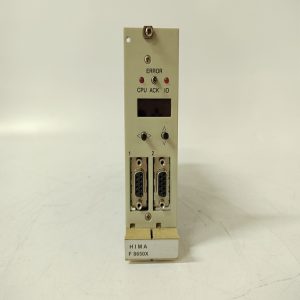
Standard single‑slot plug‑in module for HIQuad rack. Front‑panel LED indicators show module operating status, link activity and fault alerts. Field network wiring connects via front‑side RJ45 sockets. PCB board uses conformal‑coated protection to resist dust and mild corrosive gas inside industrial cabinets. Gold‑plated rear connectors mate with rack backplane for power and internal‑bus signal interaction.
Real‑world Site Application
Installed inside ESD / BMS safety instrumented cabinets of chemical plants and thermal‑power units. It delivers safety‑system data to DCS/SCADA host stations, allowing operators to read interlock‑relevant process values and alarm logs. When K9203 fails, safety‑logic calculation and trip‑output functions of HIQuad CPU keep working normally; only Ethernet data upload will be interrupted. System will generate communication‑channel fault alarm.
Installation & Commissioning Guidance
- Apply strict ESD anti‑static protection during module handling. Hot‑swap replacement is permitted while the safety rack remains online.
- Industrial shielded Ethernet cables are recommended. Separate network wiring from high‑power cables to prevent electromagnetic interference.
- After module insertion, confirm full seating of rear connectors. Download validated HIQuad rack configuration, set correct IP‑address parameters. Verify data and alarm‑message transmission to upper‑level host.
- Keep backup copies of rack configuration files. On‑site component‑level repair is forbidden; replace the whole communication‑module assembly for permanent hardware damage.
.jpg)
Typical On‑site Troubleshooting Points
- No network connection: Check Ethernet cable integrity, IP‑address matching, switch‑port status and module link‑LED indication.
- Intermittent data loss: Inspect cable shielding grounding status, cabinet temperature and dust accumulation.
- System reports communication‑card fault alarm: Confirm hardware‑configuration consistency within project software, check backplane contact condition.
- Module LED no illumination: Inspect rack backplane power supply and module insertion depth.
-300x300.jpg)
-300x300.jpg)
-300x300.jpg)
Reviews
There are no reviews yet.